7. Sortable behavior in admin listing
This is a full working example of how to implement a sortable feature in your Sonata admin listing
7.1. Background
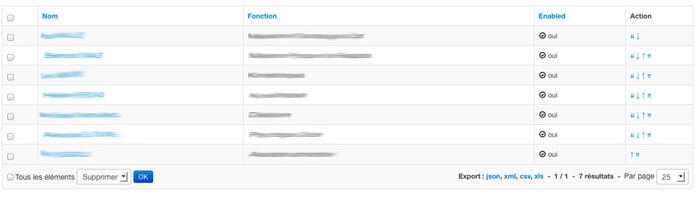
A sortable behavior is already available for one-to-many relationships (https://docs.sonata-project.org/projects/SonataDoctrineORMAdminBundle/en/3.x/reference/form_field_definition/#advanced-usage-one-to-many). However there is no packaged solution to have some up and down arrows to sort your records such as showed in the following screen
7.2. Pre-requisites
7.2.1. Configuration
- you already have SonataAdmin and DoctrineORM up and running
- you already have an Entity class for which you want to implement a sortable feature. For the purpose of the example we are going to call it
Client. - you already have an Admin set up, in this example we will call it
ClientAdmin
7.2.2. Bundles
- install
gedmo/doctrine-extensionsbundle in your project (checkstof/doctrine-extensions-bundlefor easier integration in your project) and enable the sortable feature in your config - install
pixassociates/sortable-behavior-bundleat least version ^1.1 in your project
7.3. The recipe
First of all we are going to add a position field in our Client entity:
/**
 * @Gedmo\SortablePosition
 * @ORM\Column(name="position", type="integer")
 */
private $position;
Then we need to inject the Sortable listener.
If you only have the Gedmo bundle enabled, you only have to add the listener
to your services.yaml file and skip this step.
1 2 3 4 5 6 7 8 9 | # config/services.yaml
services:
gedmo.listener.sortable:
class: Gedmo\Sortable\SortableListener
calls:
- [setAnnotationReader, ['@annotation_reader']]
tags:
- { name: doctrine.event_subscriber, connection: default }
|
If you have the stof/doctrine-extensions-bundle, you only need to enable the sortable
feature in your configuration such as
1 2 3 4 5 6 | # config/packages/stof_doctrine_extensions.yaml
stof_doctrine_extensions:
orm:
default:
sortable: true
|
In our ClientAdmin we are going to add a custom action in the configureListFields method
and use the default twig template provided in the pixSortableBehaviorBundle:
$listMapper
    ->add(ListMapper::NAME_ACTIONS, null, [
        'actions' => [
            'move' => [
                'template' => '@PixSortableBehavior/Default/_sort.html.twig'
            ],
        ]
    ]);
In order to add new routes for these actions we are also adding the following method:
// src/Admin/ClientAdmin.php

namespace App\Admin;

use Sonata\AdminBundle\Route\RouteCollection;

protected function configureRoutes(RouteCollection $collection)
{
    $collection->add('move', $this->getRouterIdParameter().'/move/{position}');
}
Now you can update your services.yaml to use the handler provided by the pixSortableBehaviorBundle
1 2 3 4 5 6 7 8 9 10 11 | # config/services.yaml
services:
app.admin.client:
class: App\Admin\ClientAdmin
arguments:
- ~
- App\Entity\Client
- 'PixSortableBehaviorBundle:SortableAdmin' # define the new controller via the third argument
tags:
- { name: sonata.admin, manager_type: orm, label: 'Clients' }
|
Now we need to define the sort by field to be $position:
// src/Admin/ClientAdmin.php

namespace App\Admin;

use Sonata\AdminBundle\Admin\AbstractAdmin;
use Sonata\AdminBundle\Datagrid\DatagridInterface;
use Sonata\AdminBundle\Datagrid\ListMapper;
use Sonata\AdminBundle\Route\RouteCollection;

final class ClientAdmin extends AbstractAdmin
{
    protected function configureDefaultSortValues(array &$sortValues): void
    {
        $sortValues[DatagridInterface::PAGE] = 1;
        $sortValues[DatagridInterface::SORT_ORDER] = 'ASC';
        $sortValues[DatagridInterface::SORT_BY] = 'position';
    }

    protected function configureRoutes(RouteCollection $collection)
    {
        $collection->add('move', $this->getRouterIdParameter().'/move/{position}');
    }

    protected function configureListFields(ListMapper $listMapper)
    {
        $listMapper
            ->addIdentifier('name')
            ->add('enabled')
            ->add(ListMapper::NAME_ACTIONS, null, [
                'actions' => [
                    'move' => [
                        'template' => '@App/Admin/_sort.html.twig'
                    ],
                ],
            ])
        ;
    }
}